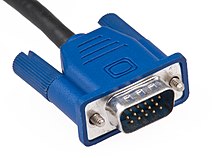
A Video Graphics Array (VGA) connector is a three-row 15-pin DE-15 connector. The 15-pin VGA connector is found on many video cards, computer monitors, and some high definition television sets. On laptop computers or other small devices, a mini-VGA port is sometimes used in place of the full-sized VGA connector.

The VGA interface is not engineered to be hot pluggable (so that the user can connect or disconnect the output device while the host is running), although in practice this can be done and usually does not cause damage to the hardware or other problems. However, nothing in the design ensures that the ground pins make a connection first and break last, so hot plugging may introduce surges in signal lines which may or may not be adequately protected against. Also, depending on the hardware and software, detecting a monitor being connected might not work properly in all cases.

Advantages of VGA over DVI
Function
DVI doesn't have to convert analog-to-digital or digital-to-analog. However, VGA has to convert digital to analog, which results in loss of the signal.
The DVI connector has pins that provide the same analog signals you'll find on a VGA connector. Therefore, you can connect a VGA monitor to it by using a plug adapter.
With DVI, your display images will run seamlessly. With VGA, your images will suffer signal loss or corruption.
You must have a video card that has the DVI port. Most new desktops will have this port.
DVI delivers digital data, meaning you'll have a clearer image. VGA won't give you this crisp image that you'll find with DVI.
Lately, CRTs have greatly improved their analog signal processing technology to the point where there's no major difference between DVI and VGA. You'd have to be a professional photographer to notice the difference.
